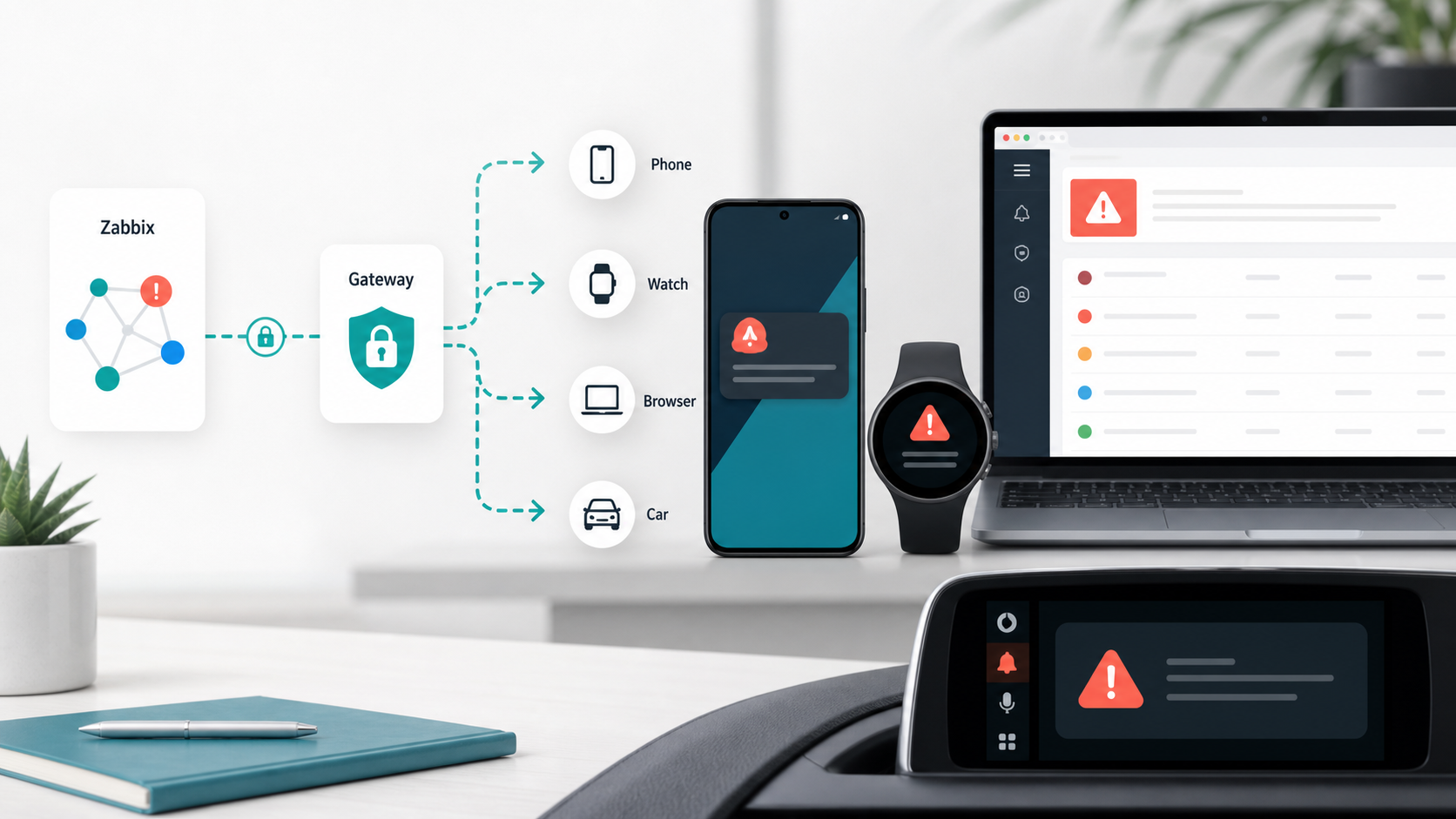
PixelWatch Alert turns monitoring noise into mobile incidents people can act on.
Zabbix sends the problem once. PixelWatch Alert delivers it to Android phone, Wear OS, browser, and car surfaces, then records who saw it, who acknowledged it, and whether it was resolved.
Dashboards are useful. They are not an on-call responder.
PixelWatch Alert was created for small operations teams and hands-on system owners who already trust Zabbix, but need a better last mile than email, chat noise, or a screen someone might not be watching. The gateway keeps Zabbix as the source of truth while making the alert path personal, visible, and auditable.
The alert path
- Receives Zabbix trigger events.
The webhook accepts problem and recovery payloads with event, trigger, host, severity, tag, and runbook fields. - Normalises the incident.
The gateway maps severity, tenant, user, routing, suppression, quiet hours, and delivery safety policy. - Delivers to the devices responders carry.
Android phone remains the first-class path, with Wear OS, browser push, and car-friendly surfaces available where configured. - Records proof.
Delivery receipts, acknowledgements, silences, failed writes, and reports give the team a timeline after the incident.
One incident, several useful views
redis802.adepteo.net | 7m behind master
Acknowledge | Silence | Open runbook
Critical
This page uses a generated product visual and CSS mockups today. We can replace them with real screenshots after capturing approved Android, Wear OS, browser-console, and Android Auto views from a demo tenant with no customer data.
What happens when Zabbix fires
Minimal webhook script
var p = params;

var payload = {
  eventid: p.event_id,
  triggerid: p.trigger_id,
  event_name: p.event_name || p.trigger_name,
  display_title: p.event_name || p.trigger_name,
  display_summary: p.alert_message || p.event_opdata || '',
  alert_message: p.alert_message || '',
  trigger_name: p.trigger_name || '',
  event_opdata: p.event_opdata || '',
  severity: Number(p.event_nseverity || 0),
  host: p.host_name || '',
  hostid: p.host_id || '',
  problem_started_at: Number(p.event_date_ts || Math.floor(Date.now() / 1000)),
  tags: [],
  url: p.trigger_url || p.event_url || '',
  source_url: p.trigger_url || p.event_url || '',
  status: String(p.event_value) === '1' ? 'PROBLEM' : 'RESOLVED'
};

if (p.event_tags_json) {
  try {
    payload.tags = JSON.parse(p.event_tags_json);
  } catch (e) {
    payload.tags = [];
  }
}

var req = new HttpRequest();
req.addHeader('Content-Type: application/json');
req.addHeader('x-zbx-webhook-token: ' + p.webhook_token);
var response = req.post(p.gateway_url, JSON.stringify(payload));

return JSON.stringify({ http_code: req.getStatus(), body: response });Copy these into Zabbix
gateway_url = https://za.adepteo.net/webhook/zabbix
webhook_token = <tenant shared webhook token>
event_id = {EVENT.ID}
trigger_id = {TRIGGER.ID}
event_name = {EVENT.NAME}
alert_message = {ALERT.MESSAGE}
trigger_name = {TRIGGER.NAME}
event_opdata = {EVENT.OPDATA}
event_nseverity = {EVENT.NSEVERITY}
host_name = {HOST.NAME}
host_id = {HOST.ID}
event_date_ts = {EVENT.TIMESTAMP}
event_tags_json = {EVENT.TAGSJSON}
event_url = {EVENT.URL}
trigger_url = {TRIGGER.URL}
event_value = {EVENT.VALUE}What the gateway receives
{
  "eventid": "998877",
  "triggerid": "554433",
  "event_name": "Redis replica lag is high",
  "display_title": "CRITICAL: Redis replica lag",
  "display_summary": "redis802.adepteo.net is 7m behind master",
  "severity": 5,
  "host": "redis802.adepteo.net",
  "hostid": "12042",
  "problem_started_at": 1782577800,
  "tags": [
    { "tag": "env", "value": "prod" },
    { "tag": "role", "value": "redis" }
  ],
  "url": "https://zabbix.example/zabbix/tr_events.php?triggerid=554433",
  "status": "PROBLEM"
}Send a controlled test
curl -sS https://za.adepteo.net/webhook/zabbix \
  -H 'Content-Type: application/json' \
  -H 'x-zbx-webhook-token: <tenant shared webhook token>' \
--data-binary @sample-pixelwatch-alert.jsonWhat we can capture from the system
Yes. The safest screenshot set is a demo tenant with synthetic alerts: Browser Console overview, active alert detail, delivery report, Android phone notification, Wear OS alert, and Android Auto projection. The public landing page should avoid real customer hostnames, tokens, event IDs, or private runbook links.
- Create or use a demo tenant with a synthetic Zabbix event and no production credentials.
- Capture browser-console pages directly from
za.adepteo.netafter sign-in. - Capture Android and Wear OS screens from a test device or emulator using the demo alert.
- Crop only the alert surfaces, redact tokens and private URLs, then replace the CSS mockups above with approved screenshots.